



Teamcenter and Teamcenter X both provide robust capabilities to streamline engineering processes and manage complex product data. While each solution delivers the power of Teamcenter, the differences in deployment, maintenance, and scalability serve distinct organizational needs. Understanding these differences is essential for determining which approach best aligns with long-term innovation goals.
Deployment model
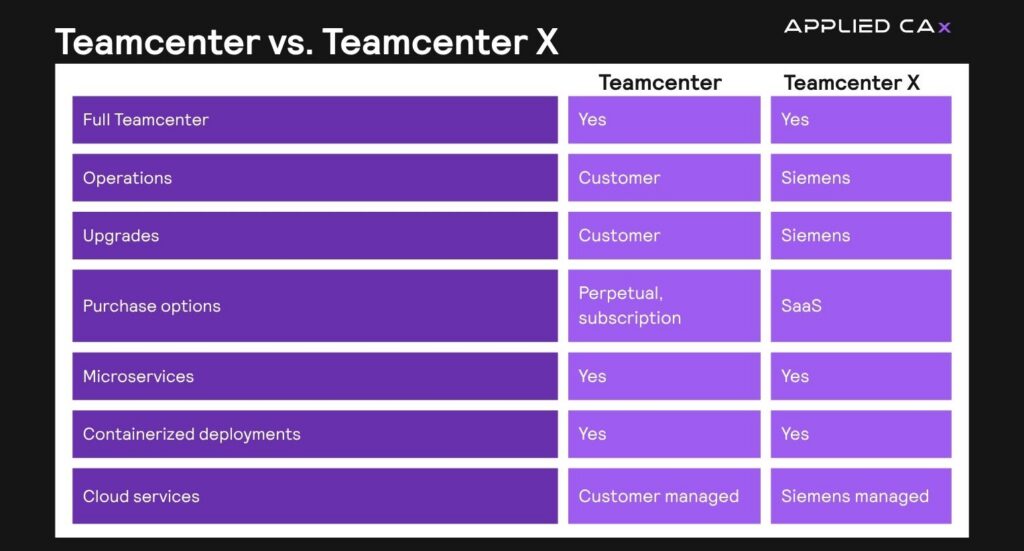
The main distinction between Teamcenter and Teamcenter X is how the software is deployed. Traditionally, Teamcenter has been implemented as an on-premises solution. Teamcenter deployment requires organizations to invest in hardware, infrastructure, and internal resources to deploy and maintain the system. This approach offers control and customization, which makes it ideal for organizations with specific security or operational requirements.
Teamcenter X is a cloud-native software-as-a-service (SaaS) solution. Hosted on secure cloud platforms such as Amazon Web Services (AWS) or Microsoft Azure, Teamcenter X eliminates the need for on-premises infrastructure while delivering the same core capabilities as traditional deployments.
Cost comparison
Cost considerations often play a key role in PLM adoption. On-premises Teamcenter typically requires upfront capital investment in hardware, software, and implementation services. Organizations retain full ownership and visibility over maintenance and upgrade investments.
Teamcenter X introduces a subscription-based model that shifts PLM from a capital expenditure to a predictable operating expense. By removing the need for hardware procurement and reducing internal system maintenance, organizations can lower the total cost of ownership and accelerate time to value.
IT requirements
IT requirements differ significantly between the two deployment models. On-premises Teamcenter requires internal resources to manage infrastructure, system performance, maintain security, and support upgrades.
With Teamcenter X, Siemens manages infrastructure, maintenance, and system performance on your behalf. This allows internal teams to focus resources on higher-value engineering and operational priorities.
Upgrade process
Maintaining up-to-date PLM systems is critical for ensuring performance and access to new capabilities. In an on-premises environment, upgrades are planned, tested, and executed by internal teams, giving organizations direct control over timing, scope, and validation before changes go live.
Teamcenter X simplifies this process through automatic updates managed by Siemens. Enhancements, security patches, and new features are delivered seamlessly to ensure that organizations always operate on the latest version. This continuous delivery model minimizes disruption and eliminates the need for complex upgrade cycles.
Scalability
As organizations grow, PLM systems must evolve to support increasing complexity. Scaling an on-premises Teamcenter environment requires additional hardware, licensing, and IT resources.
Teamcenter X leverages cloud infrastructure to provide elastic scalability. This flexibility is implemented through Teamcenter X’s four scalable SaaS packaging tiers—Essentials, Standard, Advanced, and Premium—allowing companies to upgrade as needs evolve.
Security
As with any enterprise software, data security remains a critical priority for organizations seeking to protect intellectual property and ensure regulatory compliance. On-premises Teamcenter provides organizations with direct control over data and security protocols, which may make this option suitable for industries with strict compliance and regulatory requirements. Additionally, this approach places responsibility for cybersecurity, monitoring, and updates on internal teams.
Teamcenter X delivers security through Siemens and is managed in the cloud. Hosted on platforms such as AWS and Azure, it incorporates all necessary security features like encryption, compliance, and continuous monitoring. Siemens is also responsible for implementing regular system updates.
Collaboration
Both Teamcenter and Teamcenter X establish a single source of truth that connects engineering, manufacturing, and supply chain stakeholders. Teamcenter X enhances accessibility by enabling real-time collaboration from virtually anywhere. Its cloud-based architecture supports distributed teams and integrates with major CAD systems, enterprise applications, and collaboration platforms such as Microsoft Teams.
Conclusion
Choosing between on-premises Teamcenter and Teamcenter X depends on an organization’s priorities, resources, and long-term strategy. On-premises Teamcenter offers advanced control and customization for organizations with established IT infrastructures and specialized requirements. Teamcenter X provides a modern SaaS alternative that reduces the need for internal team involvement while still offering the same benefits of on-premises Teamcenter.
By evaluating factors such as cost, IT requirements, upgrade processes, scalability, and security, organizations can determine which deployment model best supports their digital transformation goals and positions them for long-term success.
Learn more about Teamcenter here.
Learn more about Teamcenter X here.